The original travels in a cab
The signed CMR comes back to the office three weeks after delivery, when the driver passes by. Until then, the invoice waits.
Two documents decide when you get paid: the order form, which puts in writing what was agreed before departure, and the signed CMR, without which an invoice has no value in a dispute. The product follows both from draft to archive, and tells you at any moment which ones are out.
The signed CMR comes back to the office three weeks after delivery, when the driver passes by. Until then, the invoice waits.
The rate was agreed on the phone, confirmed in a voice message, and a month later nobody can find the trace of the agreement.
The document goes out by mail and disappears. With no list of what is pending, you only chase the ones you happen to remember.
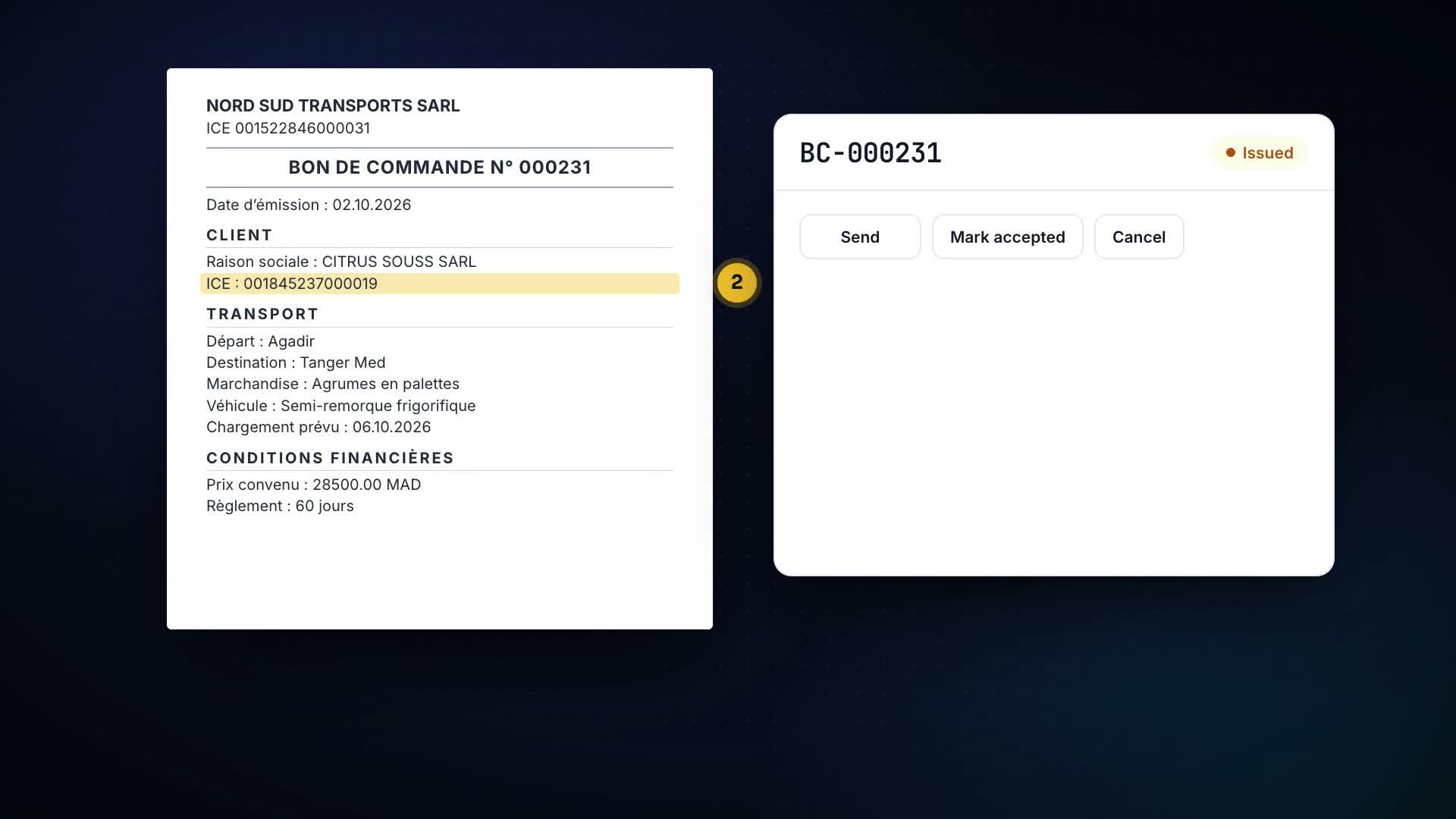
Route, loading date, cargo, truck, driver, amount, payment terms: the PDF is generated by the product, with your details and the client’s tax identifier, and is e-mailed from the screen.
The detail that matters. The sending is tracked: the document knows to which address and when it went. That is your proof, not a memory of an inbox.
The number is allocated at issuance, never at creation. While the document is a draft it can be corrected freely; once issued, it is frozen.
The detail that matters. The document keeps its own copy of everything it prints: changing a client tariff tomorrow does not rewrite a form that went out yesterday.
Issued, with the driver, signed, returned to the office, archived. The register shows how many days each note has been out and who holds it.
The detail that matters. The counter starts from the delivery date, not from the document’s creation: it measures the real time spent outside the office.
The driver photographs the signed CMR at delivery; the photo arrives long before the original. Invoicing can be prepared the same day, knowing the signature exists.
The detail that matters. A “returned vs pending” indicator per driver lets you talk to the crew with facts instead of reproaches.
Past the delay you set — five days after unloading by default — the product chases, then escalates to the manager. One rule, one alert, no useless repetition.
The detail that matters. The CMR threshold is yours: a client whose originals always come back in ten days should not trigger the same alarm as another.
The accepted form becomes the basis of the invoice, the signed CMR authorises it, and both stay attached to the file. In an audit or a dispute, the document is two clicks away.
The detail that matters. Cancelling a form requires a reason, and the reason stays in the document: the client will ask why, and the answer will not depend on the memory of whoever cancelled it.
| No. / mission | Client | Delivered | Photo | State |
|---|---|---|---|---|
| CMR-884 / M-0688 | MERCADOMA | 18/08 | received | With the driver |
| CMR-883 / M-0686 | CITRUS SOUSS | 17/08 | received | Signed |
| CMR-881 / M-0679 | MARJANE | 12/08 | — | 13 days out |
| CMR-878 / M-0671 | LEONI MAROC | 09/08 | received | Returned |
The invoicing module refuses to issue an invoice for a mission whose consignment note is not signed, and names the file. That is exactly where money is usually lost: invoiced without proof, disputed, indefensible.
Issuance freezes the content and generates the final PDF. A mistake is fixed by a corrective document, not by a silent rewrite of what the client already received.
Moving a CMR back a step is possible — that is real life — but requires a reason, which is written into the mission history with its author and time.
The digital signature status field already exists in the model: moving to e-CMR will not require reworking your data or re-entering your history.
Priced per company, not per user: whether three or twelve people use it, the invoice line is the same.
That is the expected case. The product does not replace the pad: it keeps the register of what went out, what is signed and what came back, with the photo as intermediate proof. The original keeps its legal value and its archiving.
Yes: contact details, legal identifiers and company mentions are those of your workspace. The document is generated inside the product, with no external service and without your data leaving it.
 1:47Episode 15How do you pin down what was agreed with the client before the truck leaves?
 1:58Episode 14How does a quote become a mission without retyping anything?
 1:58Episode 4How do you follow everything that’s running without a whiteboard, notebook or group chat?
 1:50Episode 5What does a mission keep once it has left: who drove, when, at what cost?
 1:51Episode 6How do you create a mission on one page instead of six screens?
 1:47Episode 7Where do customs, seals, steps and the money of a mission live?
Create the account, tick your modules, add the trucks — the first mission leaves today.